

Radio Application UX Report
- Samith Shamim
- Jan 2, 2023
- 11 min read

Updated: Jan 3, 2023
A well-known FM station wants to create a fresh mobile application. To make this mobile application exceptional, they wish to include other features in addition to their FM activities. The user experience should be optimal for a mobile application.
Product Strategy :
Market needs -
Online streaming habits of the market have increased significantly and are yet to receive a functioning, well designed and easy to use live FM radio streaming service.
The market needs a radio application that can stream their favourite radio shows on their mobile device from anywhere over the internet.
The application should be cross platform and easy to access.
The market needs the choice between free listening and a paid subscription that offers more perks.
Product goals and Corporate goals -
Make the radio stream accessible anywhere on the planet.
Increasing the number of listeners to the radio channel.
Increasing accessibility to the radio channel by making it remotely accessible.
Increasing revenue through advertisements during shows in the mobile application.
Should be capable of collecting data about the users to connect advertisers to them and provide targeted ads.
Increase the popularity of their shows, content and RJ’s.
Expand the listener community to include all age groups including Millennials and Gen Z.
Convert conventional non app users to app users.
Convert non paying users to subscribers through the app, thereby increasing revenue further.
Explore new ways of communication between hosts and listeners.
Diversify the types of content in radio shows.
Differentiate the application from the competition by offering more features and innovation.
Increase the listening time or the time a user spends on the platform.
Receive live feedback from the users through the app.
Explore all future revenue opportunities.
UX Analysis :
Competitor Analysis -
Radio Mango App
Club FM App
Red FM India App
All competitor apps have poor UX and old designs which have not been updated in a while. They offer a very poor user experience and does not offer a lot of features.
1. Radio Mango App -

The splash screen glitches and changes its size which looks very odd.
The app has no onboarding or login screens at the start.
The user is greeter by a plain screen with a play button in the middle and zero context as to what the slider around the play button does.
A now playing text widget at the bottom of the screen shows what show is playing without any album art or further information regarding the show or the host.
There is a timer button on the home screen whose function is not made clear to the user.
The interface of the side menu looks very outdated.

An option to connect to the users social media is given in the menu.
There is also an option to send a message to the RJ. It is unclear which RJ the message goes to or whether the message is a private message or a public message that can be broadcasted by the host.
There exists a page names “Vodcasts” that show the video interviews of multiple personalities. Though a nice addition, the layout of the page confuses the user by being overcrowded with options. And the published on date for the videos have been given as null suggesting that the videos may not have been updated in a while.
The next item on the side menu is Podcasts. This page unfortunately stays undeveloped showing only an error screen to the user when clicked on. It shows the user a smiley face even though it is an error screen stating podcasts are unavailable. This page also seems very similar to the “Message to RJ” page but there is no uniformity to the location of the text.
Next comes the Programme Schedule page which only repeats the same show at the same time everyday and gives the user an option to remind them of it. Seems underdeveloped and not updated. The interface of this page though is better than all the other pages as there is a clear differentiation between the content and the “Remind me” button both of which seem to be fairly laid out.
Next the Rate Us button takes you to a webpage where you can rate the app.
And finally there is an About Us page which is just two paragraphs of text about the radio station.
2. Club FM App -

The user is greeted by a splash screen which clearly indicates the Club FM logo and their colour scheme.
There are again no onboarding or login screens at the start.
The user is taken to the home screen directly which looks very similar to the Radio Mango app’s home screen but with improvements.
There is album art present, and more details regarding the on air show.
The volume slider is indicated though poorly with some text in the middle.
There is a bottom now playing bar that looks good but is very glitchy to use.
An ad is shown on the middle of the screen and there seems to be more prominence towards the ad than the radio elements of the home screen.
In the side menu there is a Message the studio button on which when clicked upon the user receives and error message asking them to login. This should have been done before during onboarding which was non existent.
Next comes the Programme Schedule page which seems to updated regularly and with the shows, details and their timings and an add to favourites button. Though the interface looks unappealing, it is a major improvement when compared to Radio Mango’s schedule page.
The one place where Radio Mango overtakes Club FM is with the clear presence of a remind me button which Club FM seems to be lacking.
There is also a Profile button which takes you to a registration screen that looks very outdated. The user is given the option to log in with various social platforms and the login with apple button suggests the app may have been updated recently. But the login with google button consists of a Google+ button which was discontinued by google themselves a long time ago. This confuses the user.

Next there exists a settings page which in which the user is given various options to change the settings of the app. This is a major improvement over Radio Mango even though the interface is hard on the eyes.
There is no uniformity in the app as the background of the homescreen and all the other pages are different.
3. Red FM India App -

The user is greeted by an animated splash screen.
Though there are no onboarding screens, the user is first taken to a login page which is a major improvement when compared to the last two apps.
The user is given the option to use various social platforms to login or to skip the log in.
The user is then taken to a screen where they have to select their location. This is a welcome addition again when compared to the previous apps.
Once the location is confirmed the user is taken to the podcasts screen. There seems to be the lack of a proper home page.
The podcast page is well laid out with a now playing widget at the bottom.
There is a bottom menu bar which again gives it an updated look when compared to the other apps.
The next button on the menu bar is the Listen button which consists of a few album arts. It is unclear to the user what these are ; whether they are shows or podcasts or music. This page also seems incomplete.
The next button is the watch button which takes you to a page with to multiple YouTube videos are embedded into the app. There exists a share button and a subscribe button indicated by a bell which may confuse some users as a notification bell.
The next button shows a contest page which just states the text that “Contests are coming soon’.
There is also a search bar on all pages which is a welcome addition even though the search page is very poorly designed.
There also exists a side menu which again consists of all the buttons on the bottom menu bar and takes you to the same pages when clicked on as before. This seems repetitive and wasteful.
The next button on the side menu is “RJ’s/Shows” button which takes the user to an incomplete page with generic text based album art.
The next page is the subscribed page which shows all of the user’s subscribed shows.
Then there exists a “Red Mike” page which seems to showcase any events going on in your city and there wasn’t any on the page.
The settings page seems very inane as there are very few useful settings in it. The Club FM settings page seemed better than this one.

The verdict :
All of the apps offer a poor user experience which can be improved on so many levels. Though some features are better on some apps than the others, there is no app that offers a consistent and user friendly experience. The Red FM app seemed to be the better off the lot even though it had its own share of shortcomings. The app had a more modern approach to UX when compared to the other two apps which were very poor at the same. The Club FM app even though had a few improvements when compared to Radio Mango, still fell short in all categories when it came to user experience. Out of all 3, the Radio Mango App has the potential to be improved the most on all aspects.
User Experience Improvements :
The interface of the app can be made very user friendly.
There should exist efficient onboarding.
Use native components in the application.
It can be made consistent by following a standard set of guidelines.
It can give clear direction to the user regarding navigating through the app.
Clear prominence can be given to the important things in the app.
A colour scheme that is easier on the eyes can be chosen and the font sizes of all text can be increased to ease the lives of all users.
All elements in the app can be broken up into separate parts and spaced well.
Improve the search feature in the app design.
The most important pages can be optimised the most and given utmost prominence.
The ease of use of all the elements of the app can be extensively tested.
Animate transitions.
The user should experience error free functionality.
Integrate behavioural gesturization in to the app.
Personalise the UX by learning about the users preferences and giving more prominence to their interests in the app.
UX Research :
Functional Requirements :
Implement the application on multiple platforms such as mobile, wearables, Apple CarPlay/Android Auto, TV app .etc
On air live radio streaming.
Filter by location.
Filter by language.
Proper onboarding for the user.
Ability to login using different methods including mobile number and social platforms.
Use techniques and tools like multi-factor authentication, encryption.
Push notifications to the user.
Provide customer support to the user.
Show ads on the app during and in between shows.
Share option for all shows.
Feature Set :
During onboarding, the user can be asked to input their Preferences for podcasts, radio shows, music .etc.
User gets to login or create an account with their credentials such as email or mobile number or using social platforms.
User gets to live stream radio shows on the air.
User could get the option to rewind a live stream but not fast forward, only if the live stream is being recorded too in real time to be put as a podcast later.
User should be shown the duration or length of the show.
User should be given in app Volume control.
User can be given the option to change the language and region of the Radio they wanna listen to.
All shows can be divided into various categories such as “Trending, Sports, News, Interviews, Music .etc”
User can be given the choice of filtering through these categories.
Record and store live shows as “Podcasts” for users who missed it live or to listen to later.
There can be Podcasts other than the radio shows which could hosted by the RJ’s or others that are prerecorded to be listened to by the users.
There should be a “share”button for all shows, podcasts or live shows for users to share it with others over various social platforms.
Give prominence to upcoming shows on the home page.
Show upcoming famous guest interviews on widgets in the home page.
Show details of the currently live show including details about the host and what’s happening that day.
Also show the “Album art” and “Details of music” if played any during the show, similar to Beats 1 Radio on Apple Music.
Give users the ability to rate shows out of 5 stars.
User can be given a “Recents” page where their most recently listened to hosts and their shows reside.
User can also be given an “Explore” page where they can explore podcasts and radio shows that align with their preferences.
User should be given the option to connect all their social media platforms such as Facebook, Instagram, Twitter .etc so they can share their favourite shows and listening preferences.
A profile page should exist where the user’s account details and credentials can be viewed and edited.
A monthly subscription based service can also be implemented through which the users, if subscribed can enjoy “Ad free listening” and “Exclusive premium content”.
A “Reminder”option can also be given to give push notifications for shows to the user if the user opts for them.
A “Timer” can be set by the user after which the radio stops playing on its own.
The user can be given the option to save and download their Favourite podcasts or shows for offline listening (Maybe limited to premium subscribed members).
An option for the user to “Favourite” the shows they like and those shows be assigned to a “Favourites” or “For you” page can be implemented.
Users can also be given the option to “Favourite” the hosts they like.
An “About us” button can be implemented which will showcase information regarding the radio station to the user in a well laid out and pleasing format.
Interviews and Radio Shows can also be video recorded and uploaded to the app in a “Video podcast” format which the user can view as they please.
Unique Feature Set :
Request to RJ option.
Get to know the host page.
Mood based suggestions.
Live streaming of video interviews.
Live chat feature during on air shows.
Participate or Call in button for listener participation.
What’s happening in town page.
Top charting songs list.
Shows, podcasts, interviews, special content exclusive only to the app.
Offline listening feature.
Emergency alerts and broadcasting.
Traffic reports collected from users and broadcasted.
In-app chat bot for user support.
Special Radio contests can be held to increase app user base.
Unique Feature Set (Explained) :
During live shows the user gets an option to put in a request through the app to the RJ for a special song or for a special message during the show which will be shown to the RJ.
A “Get to know the host” page where the user can learn more about the host of the show including facts about them and their interests. This could give a more intimate feeling to the user who’s listening.
Also showcase other shows done by the same host on their get to know the host page thereby directing the user towards other shows.
The user can be asked a simple question like “How was your day?”, to which the user can reply or choose an option and there could be “mood based podcasts” that consist of specific genre music or shows, to go with the users needs.
Live streaming of video interviews could also be implemented.
A public “Live chat” option during both live video shows and normal on air radio can be implemented through which the community can publicly communicate with the RJ and among themselves to express their opinions, though a safe word filter should be implemented for the same, similar to YouTube or Twitch live streams.
For shows that currently require listener participation such as shows that make a listener call in and participate in the show, an option can be implemented in the app through which a user can contact the show and save the user the hassle of listening for the mobile number announced by the RJ and dial in. A simple “Participate” or “Call in” button can help the users or listeners to more actively participate in the show.
A section can be implemented that shows all the local events that are happening in the user’s city that could or could not be hosted by the Radio station to help the user get information on “What’s happening in town?”.
User can be shown all the top charting songs in a list form that will be played later during live radio shows or have been played already on a show.
There could also be special content or Radio shows that are exclusively streamed on the app and nowhere else, to increase the user base of the app.
Special interviews and shows could also be made exclusive to the app.
An “offline listening” feature can be implemented for users with devices that have an FM transmitter chip inbuilt and their headphones can be used as antenna’s to directly transmit the radio transmission to them instead of streaming over the internet.
An emergency alert and broadcasting feature can also be implemented in the app to alert users of disastrous broadcasts, through push notifications or by ringing their phones.
If an Apple CarPlay or Android Auto application is implemented, traffic reports can be collected from users who are stuck in congestions and announced during the show or pushed through as notifications to the users which will be really helpful to them.
An “in-app chat bot” can also be implemented that users can chat with to address their concerns or report any issues with the service. The bot should be capable of generating responses in real time and should only transfer the conversation to a real life person if the user opts to do so or if the bot is incapable of responding to a highly specific query.
Special “Radio contests”can be held exclusively through the app during festive events to again bring more users to the app.
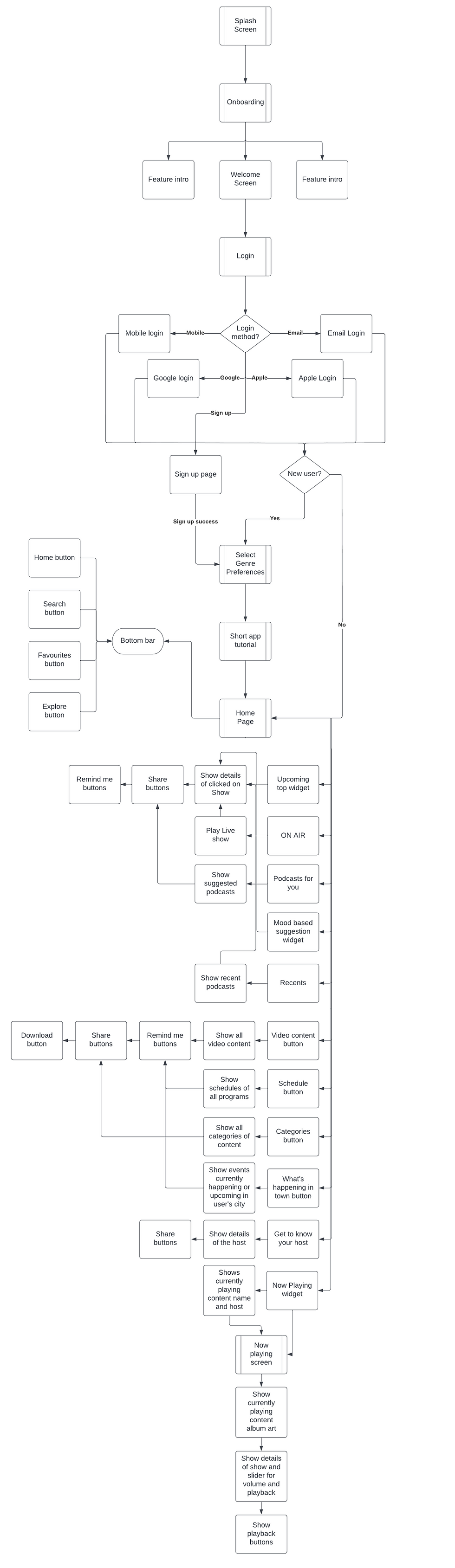
Information Architecture :


Comments